
If you have been asked to provide certified (witnessed/notarised) documentation so that your application can be finalised, it is important that documents are correctly certified.
A certified copy is a photocopy of an original document that has been stamped or endorsed by an authorised person who confirms that the copy is a true copy of the original document.
Note: Any documents supplied must be in English or be accompanied by an English translation.
What you need to do
For all documents giving evidence of name, date of birth, name changes, citizenship or residency status:
Either
- Take the original document and a photocopy to a person of suitable authority (see list below), then upload a high quality scan or photo of the certified document to your eVision portal (see below).
Or
- Bring the original copy to an AskOtago service representative at one of our AskOtago Hubs who will provide you with a certified copy of your document that you can upload to your eVision portal.
Hub locations
Appropriate authorised person
The following may certify copies of your documents:
- Justice of the Peace
- Barrister or Solicitor of the High Court
- Notary Public
- Court Registrar or Deputy Registrar
- AskOtago or other University of Otago administrative or liaison staff
- Member of Parliament
See the justiceofthepeace.org.nz/ website for a list of Justices of the Peace in your area. Students from remote areas who do not have access to anyone in the approved categories should contact AskOtago for advice.
What the authorised person needs to do
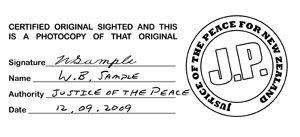
When certifying the photocopy this person must indicate the authority with which the copy is certified as true (e.g. Certified true copy, W B Smith, Justice of the Peace).
The person's name should be printed under his or her signature if not easily legible.
The certification must be in English.
Other officials or professionals should not normally be asked to certify documents. See the justiceofthepeace.org.nz/ website for a list of Justices of the Peace in your area.
If you do not have access to anyone in the approved categories, you should contact AskOtago for advice.
Providing your documents
You can upload high quality scans or photos of all correctly certified documents using the upload link sent to you in the alert in your eVison portal.
If you prefer to post the documents to us, please send them to:
Group Leader Student Administration
Student Experience
University of Otago
PO Box 56
Dunedin 9054
New Zealand
Note: If you are posting documents to us, we urge you to send certified copies only. No responsibility can be taken for original documents that are lost or damaged.
International student?
See the Submitting identification documents page on the International Office website for additional information.
Note: If you do not hold the status of a domestic student you must have a student permit to enrol in a course that lasts for longer than three months taken in a New Zealand government-funded institution. If you are in the country on the basis of a work visa you must apply for a variation to your visa to permit you to enrol. You will be required to provide a copy of your student permit. For further information contact the International Office.